Overview
ICE XL is designed to empower Excel users with seamless access to comprehensive market data—both real-time and historical—through an intuitive add-in that transforms Excel into a powerful financial analysis platform. The software enables users to build dynamic, data-driven worksheets using familiar Excel syntax and RTD functions, supporting everything from simple live quote tables to sophisticated analyses including historical time series with customizable granularity, individual data points, streaming market data via Waterfall, Level 2 market depth orderbooks, forward curve modeling with mathematical formulas, and comprehensive options matrices with Greeks and Black Scholes parameters. Built on lightweight .NET technology, ICE XL provides a responsive, integrated solution that increases productivity, decreases risk, and allows users to leverage their existing Excel skills and workflows while gaining access to institutional-grade market data across all ICE Connect products.
ICE XL Quick Start Guide
Getting Connected
- ICE XL uses your existing ICE Connect credentials and authenticates automatically — no manual login required within the add-in. Log in to ICE Launcher or any ICE Connect web platform (such as Connect Multi-Asset) using your ICE Connect credentials.
- Open Microsoft Excel — ICE XL will detect your active session and authenticate automatically.
- Once authenticated, the previously grayed-out menu options in the ICE XL ribbon will become available.
Note: If you are not yet logged in to an ICE Connect platform, ICE XL will not be able to authenticate. Make sure your ICE Launcher or web platform session is active before opening Excel.
Create Your First Quote Table (3 Easy Steps)
Step 1: Open Quote Table
- Click the Quote Table icon in the ribbon

Step 2: Add Your Data
- Click Add Symbols (or use the 🔍 search icon) to find and select the securities you want to track
-
Click Add Fields to choose what data to display (price, volume, etc.)
Tip: Drag fields up or down to reorder columns
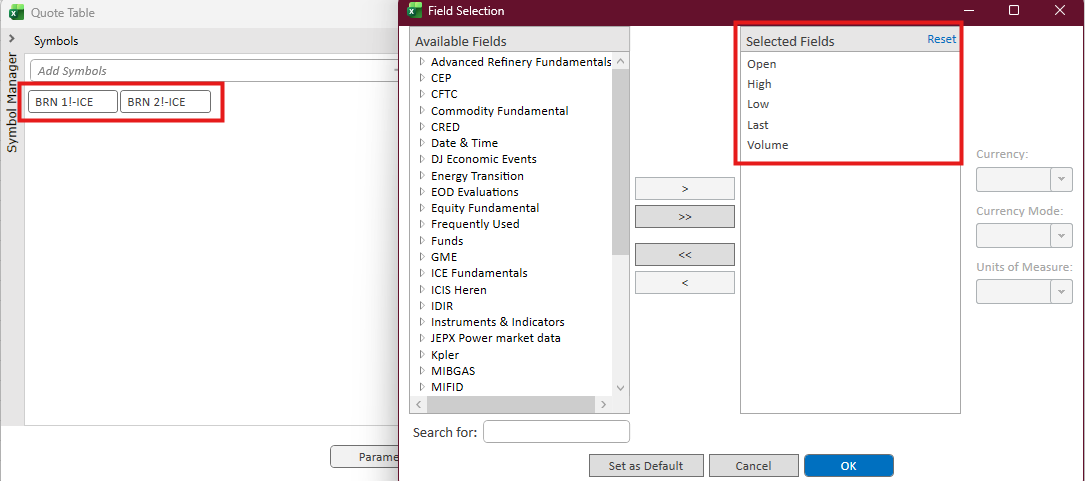
Step 3: Get Your Data
- Click Retrieve Data to build your table
- Your live-updating quote table appears in the ICE Excel spreadsheet
