Dialogue Box
Index
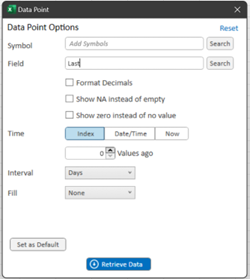
| Symbol | Add Symbol to select |
| Symbol Search | Access symbol search dialog |
| Values Ago | The number of Values ago based on the selected interval |
| Interval |
The interval of data (as applicable): Seconds, minutes, hours, days, weeks, week’s average, months, month’s average |
| Fill | Fill refers to how blank cells (i.e., cells without any data) are handled: |
| Forward | Fills in blank cells with the data from the most recent preceding cell that contains data. |
| Backward | Fill in blank cells with the data from the closest following cell that contains data. |
| End | If there are dates in the future, the cells will not be left blank but instead filled in with the data from the last cell that contained data. |
| Interpolate | The blank cell(s) will be filled in with a linear interpretation calculation of the cells preceding and following the blank cell(s). |
| Field | Field to displayed |
| Format Decimals | Set the decimal precision of the output |
| Show NA instead of empty | Output =NA() error message instead of null |
| Show Zero instead of No Value | Output = 0 instead of a blank cell |
| Set as Default | Set the currently selected configurations as the default |
| Retrieve Data | Select Retrieve Data to execute and build the Data Point in the cell within your Excel sheet |
Date/Time
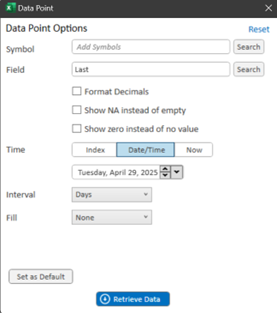
| Symbol | Add Symbol to select |
| Symbol Search | Access symbol search dialog |
| Date | Set the exact date/time to of data to display |
| Interval |
The interval of data (as applicable):
|
| Fill |
Fill refers to how blank cells (i.e., cells without any data) are handled:
|
| Field | Field to displayed |
| Format Decimals | Set the decimal precision of the output |
| Show NA instead of empty | Output =NA() error message instead of null |
| Show Zero instead of No Value | Output = 0 instead of a blank cell |
| Set as Default | Set the currently selected configurations as the default |
| Retrieve Data | Select Retrieve Data to execute and build the Data Point in the cell within your Excel sheet |
Now
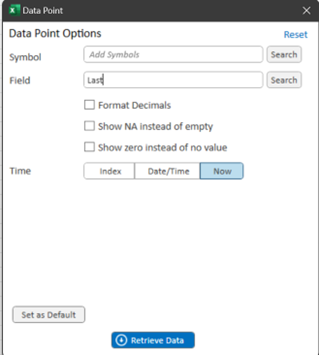
| Symbol | Add Symbol to select |
| Symbol Search | Access symbol search dialog |
| Field | Field to displayed |
| Format Decimals | Set the decimal precision of the output |
| Show NA instead of empty | Output =NA() error message instead of null |
| Show Zero instead of No Value | Output = 0 instead of a blank cell |
| Set as Default | Set the currently selected configurations as the default |
| Retrieve Data | Select Retrieve Data to execute and build the Data Point in the cell within your Excel sheet |