Parameters
Open the Quote Table tab again to adjust the output options as per your preference.
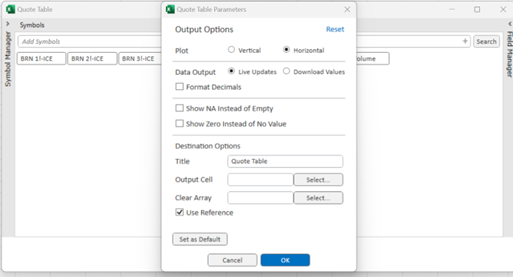
Destination Options
| Title | The label to display in the cell which contains the Quote Table Function |
| Output Cell | Select a destination cell for the Quote table output |
| Clear Array | Clear a defined array prior to any refresh |
| Use Reference | Select Checkbox to build your Quote Table with Cell References versus hard-coded symbols/fields |
| Show NA instead of Empty | This option will return the excel error message =NA() instead of an empty value. |
Plot
| Vertical | Fields will displayed vertically as rows |
| Horizontal | Fields will be displayed horizontally as columns |
Data Output
| Live Updates | Will generate a live RTD function that will return data without the need to refresh the sheet |
| Download Values | Will return the current values of the request. Refresh options are used in order to update these values |
| Format Numbers | Apply decimal place formatting to output |