Field Clarifications
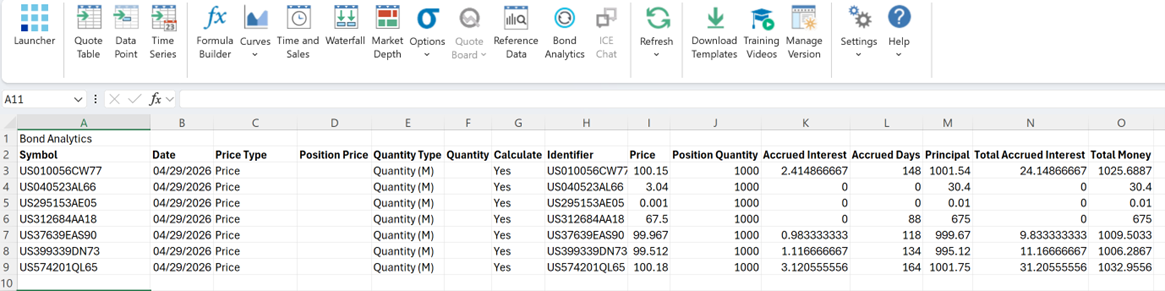
The Bond Analytics dialog uses different labels for input fields and their corresponding output fields. The following clarifications describe how user input is interpreted and how the resulting values are displayed in the Excel output.
Position Price (Input Field) vs. Price (Output Field)
The Position Price input represents the price the user wants the system to apply in calculations. In the output, this value is displayed simply as Price.
- If no Price is provided, the system automatically uses the End-of-Day (EOD) evaluated price, or defaults to par value if the EOD price is unavailable.
- Users may enter the price in any of the following formats:
| Format | Description |
| Price | The clean price of the security. |
| YTM | Yield to Maturity. |
| YTW | Yield to Worst. |
Quantity (Input Field) vs. Position Quantity (Output Field)
The input field is labeled Quantity, while the corresponding output field is shown as Position Quantity. If no quantity is provided, the system defaults the Position Quantity to 1,000.
Users can choose from two quantity types:
| Quantity Type | Description |
| Quantity (M) | The entered value is interpreted as multiples of 1,000. |
| Quantity (Actual) | The entered value is taken exactly as provided. |
Output Fields
When data is retrieved, the Bond Analytics output may include the following columns, depending on field selection:
- Symbol
- Date
- Price Type
- Position Price
- Quantity Type
- Quantity
- Calculate
- Identifier
- Price
- Position Quantity
- Accrued Interest
- Principal
- Total Accrued Interest
- Total Money
- Settlement Date
- Accrued Days